Blagdon Solar Pond or Feature Pump With LED Light 200
The Blagdon Liberty Pump has 3 operating modes, as indicated by the label on the reverse of the solar panel.
Continually on – activated by pressing the “Power on/off” button. In this mode it will run continuously until the battery has used its available charge. It will then restart by itself once the solar panel has recharged the battery to a sufficient level.
4 hours timer – activated by pressing the “Timer modes” button once. In this mode the pump will run for a pre-set 4 hours and will then stop. It will not restart automatically, requiring you to press the button to choose a mode.
Daily 4 hours timer – activated by pressing the “Timer modes” button twice (or once if the pump is currently running on the 4 hours timer). In this mode the pump will run for 4 hour period and then enter a 20-hour stand-by mode, allowing it to come on the same 4 hours every day.
Note: the indicator light next to “Daily 4hrs Timer” on the solar panel will blink slowly during the day whilst the pump is in stand-by mode, to save power it will stop blinking during the night, you can check the status of the pump in this period by pressing either of the buttons on the solar panel – the indicator light will be activated for a while before turning off again.
Below the mode indicator LEDs, there is also a red “Battery Low” indicator LED, this will blink when the battery is nearing the end of its available charge, indicating the pump will turn off shortly. The indicator will turn off once the solar panel has recharged the battery to a sufficient level.
Product Information
Product Information
Shipping & Returns
Shipping & Returns
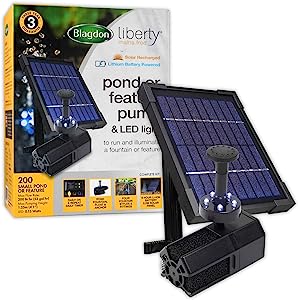
Blagdon Solar Pond or Feature Pump With LED Light 200
Blagdon Solar Pond or Feature Pump With LED Light 200
The Blagdon Liberty Pump has 3 operating modes, as indicated by the label on the reverse of the solar panel.
Continually on – activated by pressing the “Power on/off” button. In this mode it will run continuously until the battery has used its available charge. It will then restart by itself once the solar panel has recharged the battery to a sufficient level.
4 hours timer – activated by pressing the “Timer modes” button once. In this mode the pump will run for a pre-set 4 hours and will then stop. It will not restart automatically, requiring you to press the button to choose a mode.
Daily 4 hours timer – activated by pressing the “Timer modes” button twice (or once if the pump is currently running on the 4 hours timer). In this mode the pump will run for 4 hour period and then enter a 20-hour stand-by mode, allowing it to come on the same 4 hours every day.
Note: the indicator light next to “Daily 4hrs Timer” on the solar panel will blink slowly during the day whilst the pump is in stand-by mode, to save power it will stop blinking during the night, you can check the status of the pump in this period by pressing either of the buttons on the solar panel – the indicator light will be activated for a while before turning off again.
Below the mode indicator LEDs, there is also a red “Battery Low” indicator LED, this will blink when the battery is nearing the end of its available charge, indicating the pump will turn off shortly. The indicator will turn off once the solar panel has recharged the battery to a sufficient level.
Product Information
Product Information
Shipping & Returns
Shipping & Returns
Description
The Blagdon Liberty Pump has 3 operating modes, as indicated by the label on the reverse of the solar panel.
Continually on – activated by pressing the “Power on/off” button. In this mode it will run continuously until the battery has used its available charge. It will then restart by itself once the solar panel has recharged the battery to a sufficient level.
4 hours timer – activated by pressing the “Timer modes” button once. In this mode the pump will run for a pre-set 4 hours and will then stop. It will not restart automatically, requiring you to press the button to choose a mode.
Daily 4 hours timer – activated by pressing the “Timer modes” button twice (or once if the pump is currently running on the 4 hours timer). In this mode the pump will run for 4 hour period and then enter a 20-hour stand-by mode, allowing it to come on the same 4 hours every day.
Note: the indicator light next to “Daily 4hrs Timer” on the solar panel will blink slowly during the day whilst the pump is in stand-by mode, to save power it will stop blinking during the night, you can check the status of the pump in this period by pressing either of the buttons on the solar panel – the indicator light will be activated for a while before turning off again.
Below the mode indicator LEDs, there is also a red “Battery Low” indicator LED, this will blink when the battery is nearing the end of its available charge, indicating the pump will turn off shortly. The indicator will turn off once the solar panel has recharged the battery to a sufficient level.